What NMEA actually is
NMEA is the language onboard instruments use to talk to each other. The log reports speed through water, the GPS the position, the wind gear angle and strength, the echo sounder the depth — all as short data sentences travelling over a boat network.
Three flavours matter for sailors:
- NMEA 0183 — the classic. Lines of text such as
$IIVHW,,,,,6.4,N,,, one per reading. Old and slow, but understood almost everywhere. - NMEA 2000 — the modern bus. Binary rather than text, considerably faster, standard on newer boats.
- Signal K — not a bus but an open, JSON-based data format. It usually runs as a server on board, often on a Raspberry Pi, and translates between the worlds.
Why you need a gateway
An iPhone has no NMEA socket. So there is always a gateway between the boat network and the phone: a small device that picks up the instrument data and puts it on the onboard Wi-Fi. Common options are ready-made Wi-Fi gateways, multiplexers with a Wi-Fi module, and Signal K servers on a small computer.
In practice that means:
- The gateway sits on the instrument bus and either creates a Wi-Fi network or joins your onboard one.
- The iPhone is on that same network.
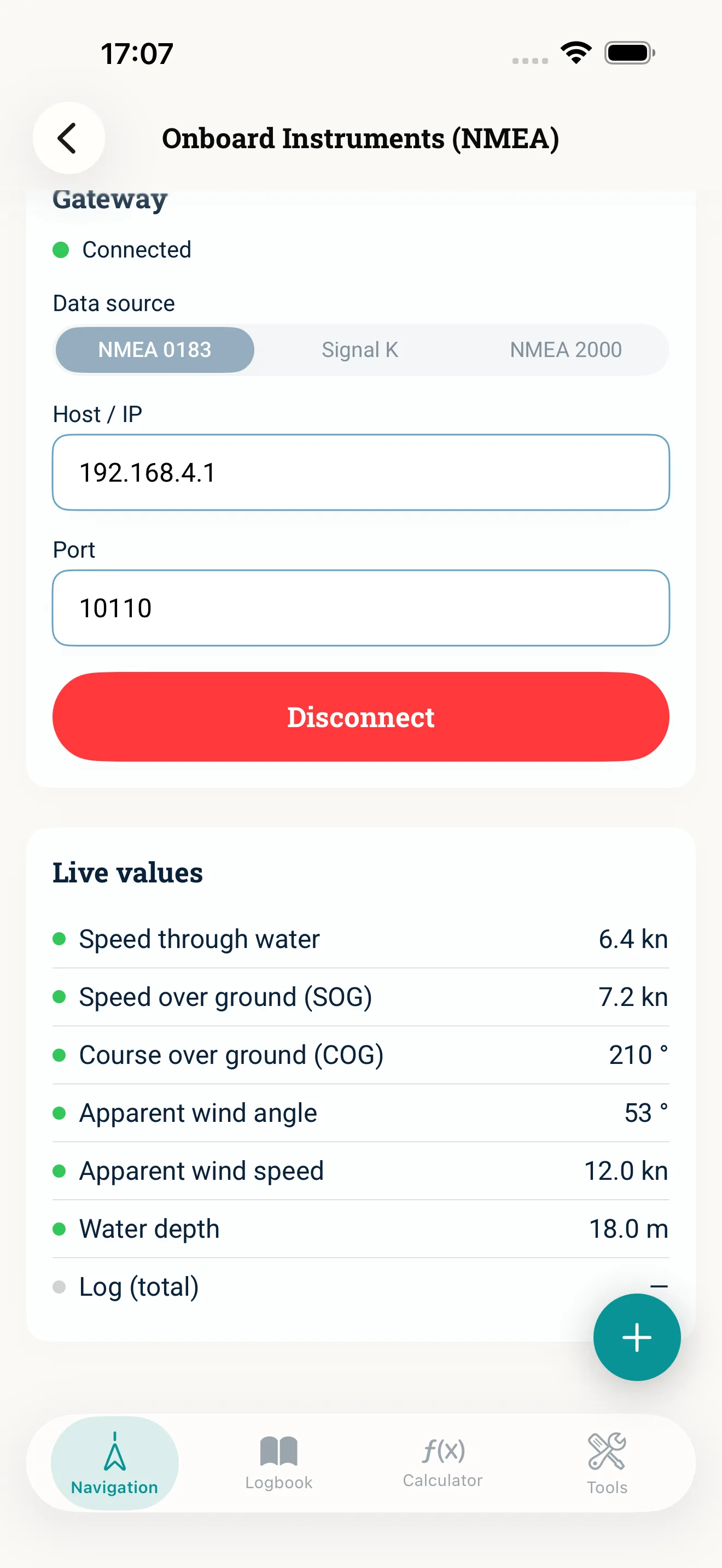
- The app connects to the gateway by host and port; port 10110 is common for NMEA 0183 and 3000 for Signal K.
Without a gateway there is no connection, and no app changes that. It is not a limitation of NauticCalc but of how the boat is wired.
What the live values buy you
The practical gain is unspectacular, and noticeable precisely for that reason: you retype less.
- Speed through water is the value course correction and current correction need — not speed over ground from the GPS. That distinction is exactly what tends to get lost when retyping.
- Course and speed over ground from the GPS, together with speed through water, give you the current — the app can derive it instead of leaving you to estimate.
- Apparent wind angle and speed from the masthead feed the calculation back to true wind.
- Depth goes into the logbook entry at the tap of a button rather than into your memory.
Each of these transfers saves more than typing: it removes a source of error. One transposed digit in speed through water follows you all the way down the course chain.
Security and privacy
The connection is a plain network connection on the local onboard Wi-Fi, between your iPhone and your gateway. There is no server in between, no sign-in, no cloud. Values are only stored where you put them yourself — in a logbook entry, for instance.
On the first connection attempt iOS asks for local network permission. Without it no connection can be made; you can grant it later under Privacy in the iOS settings.
Common mistakes
- The wrong Wi-Fi. The iPhone is still on the marina network or on mobile data instead of the boat network.
- Speed over ground instead of through water. Correction work needs speed through water — with current running, the two differ noticeably.
- Network permission declined. The iOS dialog appears once; dismiss it and the connection stays silent.
- Expecting everything to be there. A gateway only sends what the instruments provide. No log transducer, no speed through water — the app cannot invent it.
In short
NMEA on board is not an end in itself: it takes the reading and retyping off your hands and keeps the values consistent between instrument, calculator and logbook. The prerequisite is a gateway on the onboard Wi-Fi. In NauticCalc the onboard instruments are marked beta — the gateway dialects of third-party hardware simply cannot all be signed off in advance.
Read next: Onboard instruments (feature) · Connect a gateway (guide) · Logbook